Finally a very well-designed keyboard!
03/10/2023
When you spend your days typing on your keyboard, you naturally seek to make life easier. Unfortunately, classic keyboards seem to pursue the opposite goal.
The remnants of history
If our keyboards are so poorly designed, it's not intentional. It's because they have retained the constraints of their mechanical ancestors.
The keys are offset like on old typewriters where this arrangement was constrained by the presence of metal rods connecting them to the "characters" striking the inked ribbon. This offset takes up more space and is annoying when using all ten fingers to go faster.
The distribution of letters was intended to limit the risk of collision of the printing mechanisms.
There could only be two symbols per key. The addition of new characters encouraged the multiplication of keys on more recent keyboards. This forces fingers into tiring extensions and less precise actions to reach peripheral keys.
The advantages of the OLKB
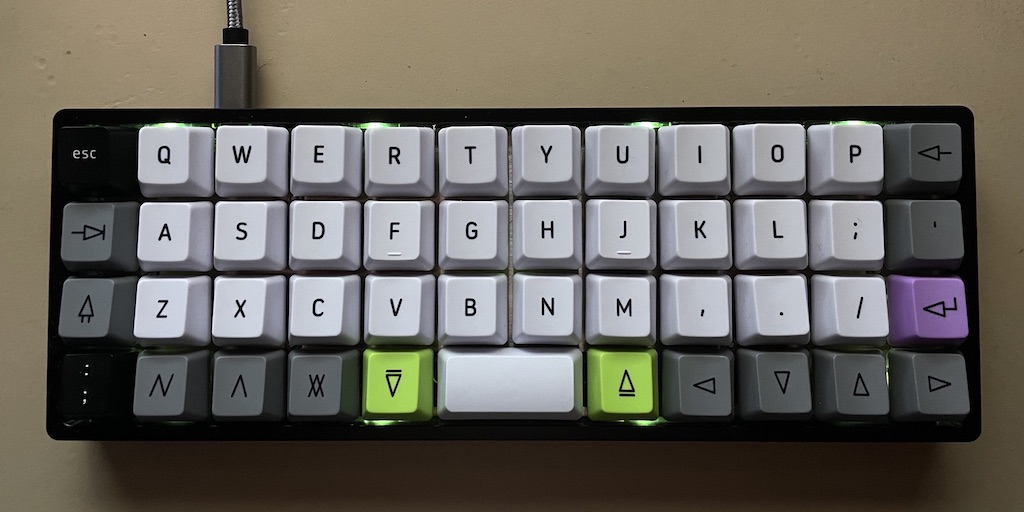
The keyboard shown in the photo above is a "Planck" OLKB. Planck is the name given to it by its designer. OLKB is an acronym for OrthoLinear KeyBoard. Ortholinear designates the regular column arrangement of keys that facilitates finger movement to reach the keys.
Well, regarding the key distribution, there is no change. But when you've spent hours memorizing the position of each character, you don't want to start over.
However, this keyboard is very compact; reduced to three main rows, each key is at most one row away from the central position.
The two (green) keys on either side of the small space bar multiply the possible values of each key, like the classic "Shift," "Alt," or other "Cmd" keys on classic keyboards. But on the OLKB, the position of these alternative keys under the thumbs makes them much more convenient to use. One wonders why thumbs are so poorly used on classic keyboards; why confine them to the space bar alone?
And moreover, and this is a major advantage, this keyboard is adaptable at will: you can reorganize the key functions as you wish! In this example, the bottom left key gives direct access to the ":" while on a classic QWERTY keyboard, it requires the synchronized action of the two little fingers of each hand. In the context of using the "vi" text editor so appreciated by all numerunique staff, this character is very used. You can't imagine how good it feels to have it directly available so easily!
You get a better overview of this keyboard's potential with the description of its keys:

There are many other initiatives to remedy the flaws of classic keyboards. This one is undoubtedly the most accomplished.